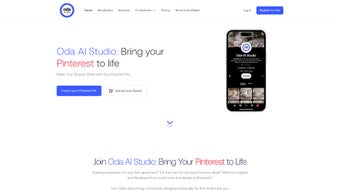

Download Oda Studio – Free Web-Based Moodboard Tool for Interior Design (Windows, Mac, iOS, Android)
Transform your interior design dreams into reality with Oda Studio, a powerful, free, and secure web-based moodboard tool designed for both beginners and professionals. Whether you're redecorating a living room, designing a bedroom, or planning a full home makeover, Oda Studio simplifies the creative process with intuitive design features. With a wide variety of styles—such as mid-century modern, bohemian, minimal, Scandinavian, and industrial—users can explore multiple aesthetics effortlessly.
Choose from rich color palettes including navy, salmon, olive, warm beige, and terracotta to match your vision. The platform also lets you incorporate lifestyle elements like indoor plants, landscape wall art, abstract art, and textured fabrics, all of which are automatically coordinated into a cohesive, visually stunning base image. Oda Studio ensures design consistency and enhances creativity by helping users visualize their space before making any purchases.
With no software installation required, it runs smoothly on desktop and mobile browsers, making it ideal for on-the-go inspiration. Your data is protected through strict privacy policies, ensuring your design ideas stay private and secure. Whether you're a DIY enthusiast or a seasoned designer, Oda Studio offers endless possibilities for personalized digital mood boards.
Key Features of Oda Studio – Your All-in-One Interior Design Companion
Oda Studio stands out in the crowded digital design space thanks to its smart, user-centric features. One of the most impressive aspects is its style library, which offers curated themes like mid-century modern, bohemian, minimalist, and coastal. Each style comes with pre-selected color schemes, furniture shapes, and decor elements, helping users jumpstart their design process without needing advanced design knowledge.
The color palette generator is another standout feature. Users can choose from over 20 carefully curated colors—ranging from deep navy and soft salmon to earthy olive and warm terracotta—each designed to harmonize with specific styles. The tool intelligently adjusts textures and patterns based on your color choice, ensuring visual balance.
Another major highlight is the element customization system. You can add plants, abstract wall art, landscape prints, vintage mirrors, and woven textiles with just a few clicks. These elements aren’t just overlaid—they’re rendered in context, so you can see how they interact with lighting, space, and other design components. The auto-generated base image feature instantly creates a high-quality, realistic preview of your moodboard, saving hours of manual editing. This is especially useful for clients or collaborators who need to visualize concepts quickly.
For professionals, Oda Studio includes export options and collaboration tools, allowing you to share your moodboards via link or embed them into presentations. The platform also supports version history, so you can track changes and revert to earlier designs if needed. All features are accessible directly through your web browser—no downloads, no installations. Whether you're working on a Windows PC, Mac, iPhone, or Android tablet, Oda Studio delivers a seamless experience across devices.
How to Use Oda Studio: Step-by-Step Guide for Beginners and Pros
Using Oda Studio is simple and intuitive, even for those with no design background. Start by visiting the official website and signing up for a free account—no credit card is required. Once logged in, you’ll be greeted by a clean dashboard where you can begin a new moodboard. The first step is selecting a design style from the available options. Each style comes with a default color palette and furniture layout, but you’re free to customize everything.
Next, choose your primary color from the palette. As you select, the interface updates in real time, showing how the color influences the overall mood of the space. You can then add elements like plants, wall art, or textured rugs by clicking the “Add Element” button. The tool suggests relevant items based on your style and color choice, making the process feel guided yet creative. For example, choosing a bohemian style with olive green might prompt suggestions for macramé hangings and rattan furniture.
Once your composition is complete, click “Generate Base Image” to create a photorealistic preview. This image can be downloaded in high resolution, shared via link, or used in client proposals. You can also save your project and return to it later, making it perfect for long-term design projects.
For teams, the collaboration feature allows you to invite others to view or edit your moodboard in real time. All changes are synced instantly, and you can leave comments or notes directly on the design. With Oda Studio, the entire design workflow—from inspiration to presentation—is streamlined and accessible from any device with a modern browser.
Compatibility & Accessibility: Works on Windows, Mac, iOS, and Android
One of the biggest advantages of Oda Studio is its cross-platform compatibility. Unlike many design tools that require specific software installations or are limited to certain operating systems, Oda Studio is a web-based application. This means you can access it from any device with an internet connection and a modern browser—whether you're using a Windows PC, Mac, iPad, iPhone, or Android smartphone or tablet.
The interface is fully responsive, adapting seamlessly to different screen sizes. On a desktop, you get a wide canvas with drag-and-drop precision. On mobile, the layout simplifies to a touch-friendly design, allowing you to browse styles, select colors, and add elements with ease. This flexibility makes Oda Studio ideal for users who want to brainstorm ideas while commuting, waiting in line, or relaxing at home.
Performance is optimized for speed and stability. Even on older devices, the tool loads quickly and runs smoothly thanks to efficient front-end coding and cloud-based rendering. No heavy downloads or updates are needed—everything is handled automatically. The platform supports major browsers including Chrome, Safari, Firefox, and Edge, ensuring broad accessibility. Whether you're a professional designer on a Mac Pro or a beginner using an Android tablet, Oda Studio delivers consistent performance and a polished user experience.
Pros and Cons of Oda Studio – Honest User Feedback
- Pros: Free to use with no hidden costs; intuitive, beginner-friendly interface; real-time visual feedback; wide variety of styles and color palettes; auto-generated base images; cross-device compatibility; secure data protection; no software installation required.
- Cons: Advanced features like team collaboration and export customization require a paid subscription; limited offline functionality; some users may find the element library slightly restrictive compared to full design software.
Frequently Asked Questions (FAQ)
Is Oda Studio free to download and use?
Yes, Oda Studio is completely free to use with no installation required. You can access all core features—style selection, color palettes, element addition, and base image generation—without any cost. Premium features are available through a subscription plan.
Can I use Oda Studio on my iPhone or Android phone?
Absolutely. Oda Studio is a web-based tool that works on all modern smartphones and tablets. Simply open your browser and visit the website to start designing on iOS or Android devices.
Do I need to install software to use Oda Studio?
No. Oda Studio is entirely browser-based. There’s no software to download or install. Just visit the website and start creating your moodboard immediately.
How secure is my data on Oda Studio?
Your design projects are protected by strong privacy policies and encryption. Oda Studio does not share your data with third parties. All user information is stored securely and only accessible by you.
Can I share my moodboards with clients or friends?
Yes. You can generate a shareable link to your moodboard, which can be sent via email or messaging apps. You can also embed the image into presentations or websites.
Conclusion: Why Oda Studio is a Must-Try for Design Enthusiasts
If you're looking for a free, secure, and easy-to-use tool to bring your interior design ideas to life, Oda Studio is an excellent choice. Whether you're a homeowner planning a renovation, a designer showcasing concepts, or a creative exploring new styles, this web-based moodboard app offers everything you need. Its intuitive interface, smart design suggestions, and real-time preview generation make the creative process enjoyable and efficient. With support for Windows, Mac, iOS, and Android, you can design anytime, anywhere.
While the free version offers powerful tools, upgrading to a paid plan unlocks advanced collaboration and export options. But even without a subscription, you’ll find immense value in the core experience. Don’t miss the chance to visualize your dream space instantly. Download Oda Studio today and start creating your personalized digital moodboard—no cost, no hassle, just creativity.



.png)



